


Most teams don’t have a customer feedback problem. They have a reading problem.
The surveys go out, the responses come back, and the numbers (the CSAT, the NPS) get pulled into a dashboard within minutes. Then there’s the other column, the open-text box where customers actually said what they think. Thousands of comments, in a dozen phrasings, sitting in a spreadsheet that someone keeps meaning to go through. That’s where the real reasons hide. And it’s exactly the part that gets skimmed, sampled, or skipped. Because reading it all by hand simply doesn’t scale.
This is the gap AI customer feedback analysis closes. With AI features, you can read every comment, group what’s being said, and put the “why” next to the “what” fast enough that you can act while the feedback still matters. But using it badly, it’s a summary nobody trusts. This guide covers what AI actually does with feedback, how to build a loop that ends in action rather than a report, and how to choose a tool without buying the hype.
A quick note on where this comes from. Checker has spent 20+ years running mystery shopping and customer experience programs across 60 countries, and builds its own research technology, including the AI that checks and scores open-text responses. So this is written from inside the problem, not from a features page.
What is AI customer feedback analysis?
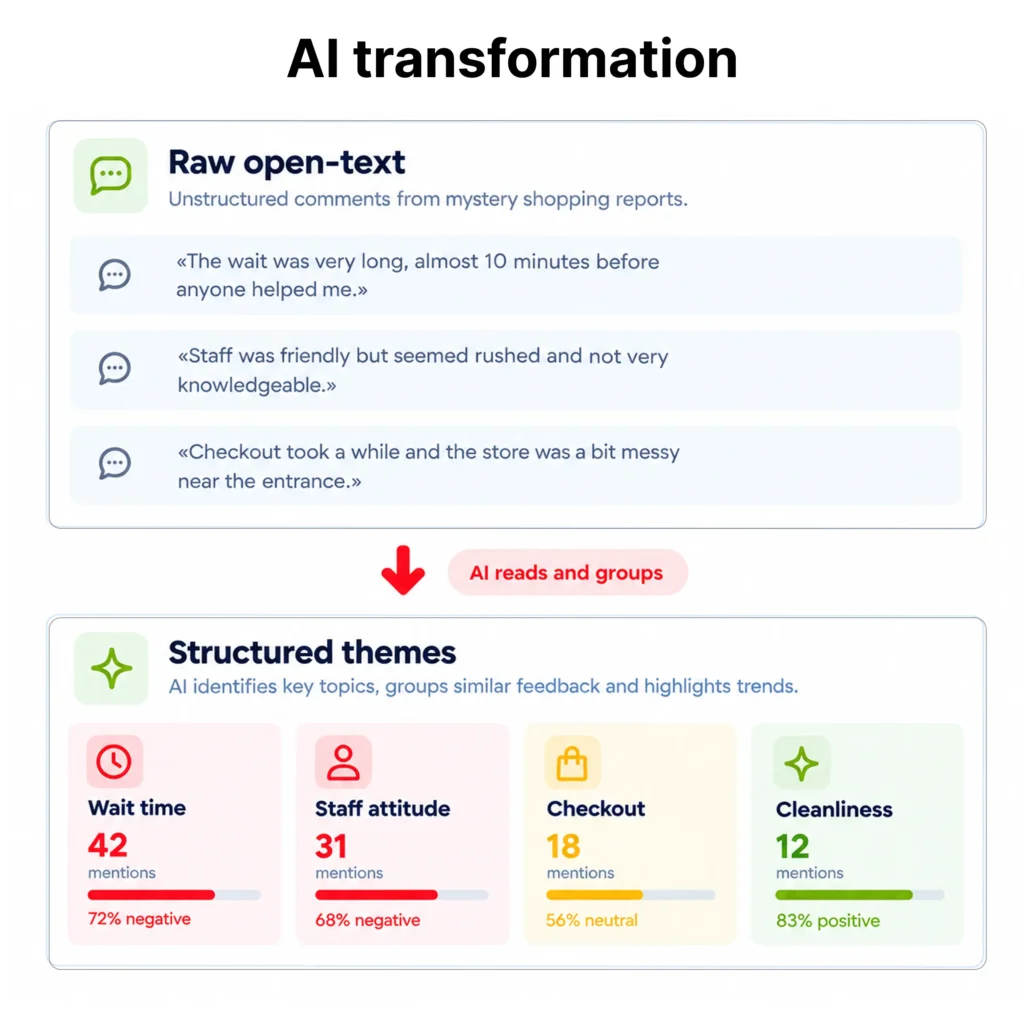
AI customer feedback analysis is the use of machine learning and language models to automatically read, categorize, and interpret customer feedback. Especially open-text comments. So teams can see the main themes, the sentiment behind them, and what to act on, without manually reading every response. It turns unstructured feedback (survey verbatims, reviews, support tickets, chat logs, mystery shopper write-ups) into structured insight you can filter, track, and route.
The key word is unstructured. A rating scale is already analysis-ready. A sentence is not, and the sentence is where the useful detail lives. AI is what makes that column usable at volume.
Why open-text feedback usually goes unread
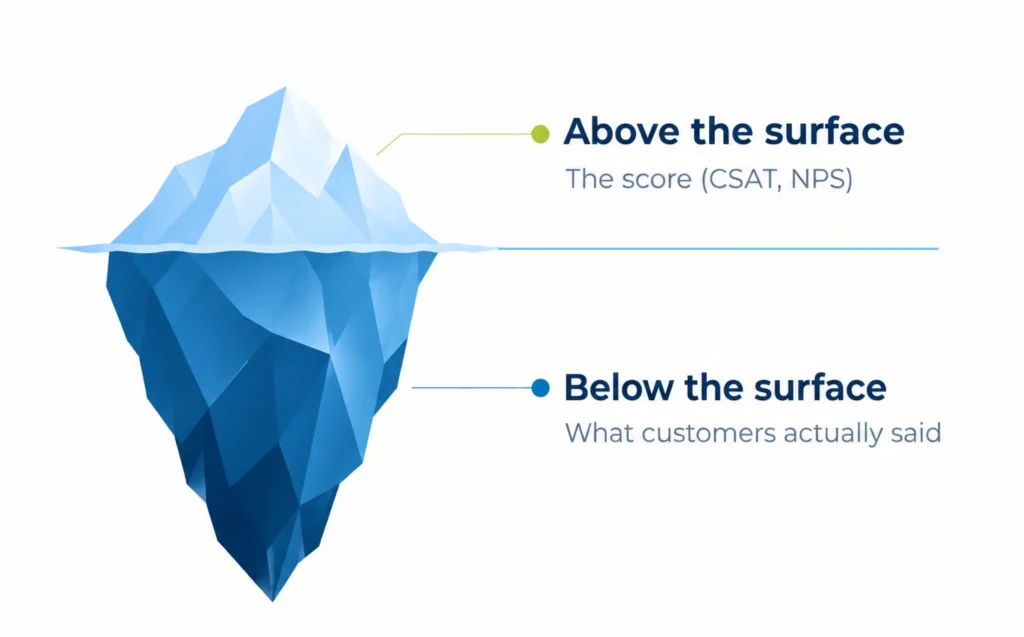
Structured feedback tells you a score dropped. It rarely tells you why. The why is almost always in the open text. And open text is exactly what manual processes can’t keep up with.
Picture a retail brand running a post-visit survey across 200 locations. The scores refresh in real time. The comment field collects maybe 4,000 responses a month. Reading those properly, tagging themes, spotting a spike in one region, flagging the angry ones, is a full-time job nobody has. So it gets sampled. Someone reads the first fifty, forms an impression, and moves on. A store with a genuine, repeated complaint about one staff member gets lost in the average.
The same thing happens in agencies and research teams at a larger scale. When you’re processing feedback for clients, the open-ended responses are both the most valuable deliverable and the biggest manual bottleneck, the coding, the theme-tagging, the quality-checking of every write-up. It’s slow, it’s expensive, and it’s inconsistent between whoever happens to be doing it that week.
That bottleneck is why AI features have moved from nice-to-have to expected. In 6sense’s B2B Buyer Experience Report for 2025, 93% of software buyers said AI features were part of what they bought. Buyers aren’t asking whether a platform has AI anymore. They’re asking what it actually saves them.
What AI actually does with feedback, and what it doesn’t
“AI” gets stretched to cover everything, so it helps to be specific. Here’s what genuinely works today, roughly in order of how reliable it is.

1. Theme and topic grouping
AI clusters thousands of comments into recurring topics (wait time, staff attitude, app checkout, cleanliness) without you predefining every category. This is the single biggest time-saver. It turns a wall of text into a ranked list of what people actually keep mentioning.
2. Sentiment analysis
Each comment gets tagged positive, negative, or neutral, so you can see not just what’s mentioned but how people feel about it, and watch that shift over time or by location.
3. Summarization
Instead of reading 4,000 comments, you read a paragraph that fairly represents them, with the ability to drill into the raw responses behind any theme. The summary is a starting point, not a replacement for the source.
4. Coherence and quality checks
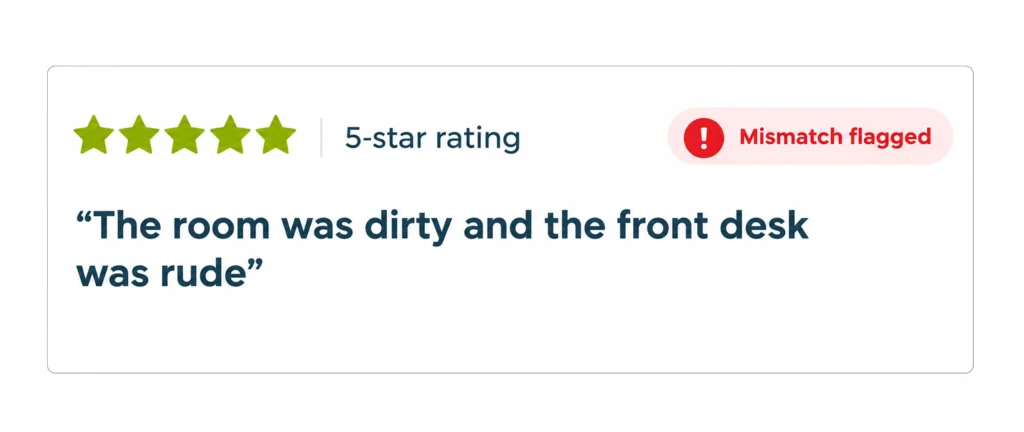
This is the unglamorous, high-value use. AI checks whether a response actually holds together, whether the written comment matches the score given. A five-star rating sitting next to “the room was dirty and the front desk was rude” is a data-quality problem, and catching it by hand across large questionnaires eats hours. This is exactly the kind of AI Checker built into its platform, automatic grammar and coherence checks, plus penalty/bonus scoring applied consistently rather than calculated by a person in a spreadsheet.
5. Prioritization and alerting
AI can flag the feedback that needs a human now (a safety issue, a churn-risk complaint, a compliance breach) and route it. Instead of letting it wait for the monthly review.
Now is the honest part. AI is very good at scale and speed, and still imperfect at nuance. It can misread sarcasm, flatten a subtle complaint into a generic theme. And it will sound confident either way. Treat it as the analyst that reads everything and drafts the first cut, not the one that signs off the final decision. The teams that get value from it keep a human in the loop for interpretation and for anything high-stakes. The teams that get burned let the summary become the truth and stop checking the source.
| Where AI is reliable | Where to keep a human |
| Grouping thousands of comments into themes | Reading nuance, sarcasm, and mixed signals |
| Tagging sentiment at scale | Interpreting why a theme is rising |
| Flagging score and comment mismatches for review | Signing off sensitive or high-stakes cases |
| Summarizing to a first-draft overview | Deciding what to actually change |
How to turn feedback into action (closing the loop)
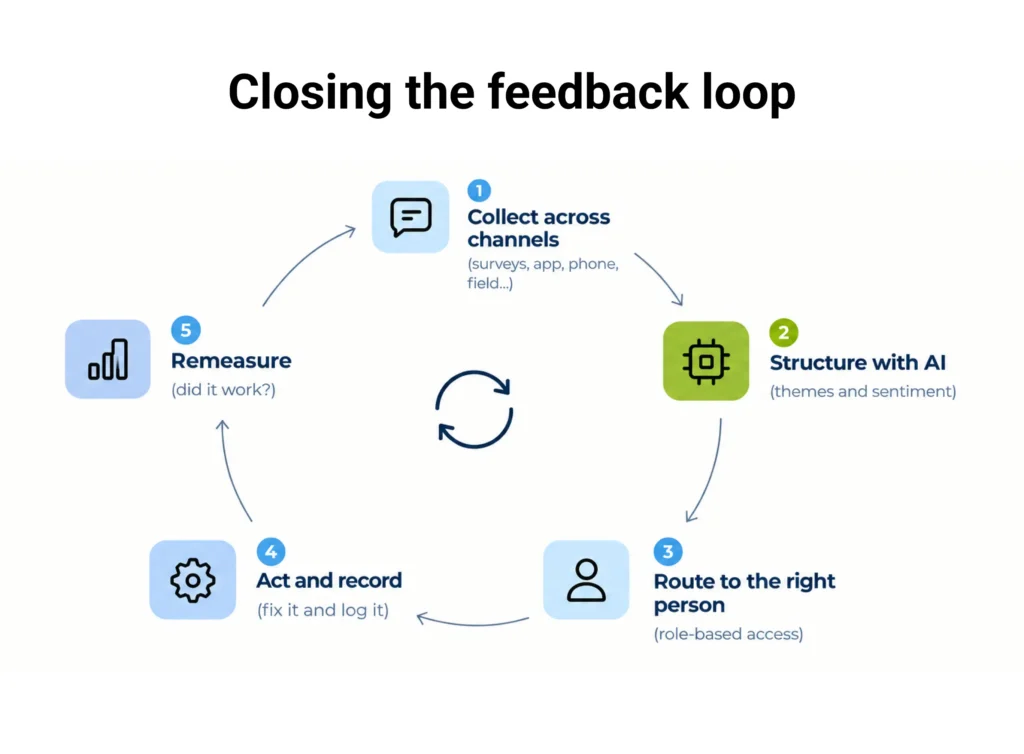
Analysis isn’t the goal. Acting is. The difference between a program that improves the business and one that produces tidy reports is whether the loop actually closes. Here’s a practical version.
- Collect across channels, into one place: Feedback arrives from surveys, email, SMS, phone, in-app, reviews, and field programs like mystery shopping. If it lands in separate tools, no analysis sees the whole picture. So centralise first.
- Structure the unstructured: Let AI group themes and tag sentiment on the open text, so every comment becomes filterable data, not just prose.
- Route it to the people who can act: This is where most programs break. Each manager should see only the feedback relevant to them. A regional manager sees their region, not head-office noise. Role-based access is what makes feedback actionable instead of overwhelming.
- Act, and record what you did: Assign the issue, fix it, note the action. Closing the loop is a real step, not a slogan. It’s the moment feedback changes something.
- Re-measure: Watch the theme and the score after the fix. If the complaint volume drops, the loop worked. If it doesn’t, you’ve learned something the summary alone wouldn’t tell you.
The technology that matters most here isn’t the flashiest AI. It’s the plumbing. Real-time dashboards so results are visible the moment data lands, role-based views so the right person sees the right feedback, and automated ingestion so nothing waits on a manual export. Get those right and AI analysis has somewhere useful to go. Skip them and you’ve automated the reading but not the acting.
What this means for brands and agencies
The features overlap, but the reason they matter splits by who you are.
If you’re a brand measuring your own customers across many locations. AI feedback analysis is an operations tool. Your priority is speed and routing. Surface the recurring issue in a specific store or region and get it in front of the manager who can fix it this week, not next quarter. The win is a shorter distance between a customer’s comment and an operational change.
If you’re a market research or CX agency. The analysis is part of what you sell. AI that codes open-ends and quality-checks responses lets a small team process more programs without adding headcount, and deliver consistent theme analysis instead of output that varies by whoever did the coding. The win is capacity and reliability. More client work, same team, and a quality bar that holds. If you deliver to clients, white-label reporting and per-client access matter as much as the analysis itself.
How to choose a customer feedback tool
Marketing pages all promise “AI-powered insights”. Score any tool you’re evaluating against what actually shows up in daily use.
- AI that names the hours it saves: Ask exactly what the AI does (theme grouping, sentiment, coherence checks, scoring). And what that removes from your week. If the answer is vague, the AI is only a slogan.
- Every channel into one place: Surveys, email, SMS, phone, in-app, and field feedback in one engine, so analysis sees the whole picture.
- A genuinely offline mobile app: For any feedback collected in the field, responses must save on the device and sync later. Long surveys lost on weak Wi-Fi are how you lose both data and the people collecting it.
- Real-time, role-based dashboards: Results the moment data lands, and each stakeholder sees only what’s relevant to them.
- Human-in-the-loop controls: Can you see the raw responses behind any AI summary, and correct a mis-tag? If the AI is a black box, you can’t trust it at decision time.
- Automated ingestion and export: Import via CSV, Excel, XML, and API so nothing waits on manual handling, plus white-label export if you serve clients.
- Privacy by design: Feedback is personal data. GDPR-grade handling isn’t a footnote in Europe, it’s something you can put in front of your own clients.
If a tool can’t clear the AI transparency, offline, and real-time items. You’re most likely looking at either a legacy platform with “AI” bolted on, or a black box you’ll stop trusting the first time it’s confidently wrong.
Common mistakes to avoid
- Trusting the summary and never reading the source: The summary is the first draft, not the verdict. Keep the raw comments one click away.
- Analyzing feedback you never act on: If the loop doesn’t close, faster analysis just gets you to the same inaction sooner.
- Leaving feedback siloed by channel: Separate tools mean no analysis ever sees the whole customer.
- Treating open text as optional: The scores tell you something moved. The comments tell you why. Skipping the why is skipping the point.
- Buying AI you can’t inspect: If you can’t see how it reached a conclusion, you can’t defend the decision it drove.
Stop reading feedback and start to act on it.
The point of customer feedback was never the report. It was the change the feedback should have triggered, the fixed checkout, the retrained team, the churn you caught before it happened. AI is what finally makes the open-text column readable at scale. Real-time, role-based reporting is what gets the right feedback to the right person. And a human in the loop is what keeps it honest.
That’s the loop Checker was built to run. An AI-driven platform for CX, VoC, and mystery shopping programs, with automatic coherence and quality checks on open-text responses, automated scoring, a fully offline mobile app, and real-time role-based dashboards, built by a team that develops its own technology, so the analysis fits your program rather than the other way around.
See it on your own feedback. Book a free demo and bring a slice of your real open-text responses. We’ll show you how much of the reading disappears, and how fast you can act on what’s left.
Frequently asked questions
It’s the use of machine learning and language models to automatically read, categorize, and interpret customer feedback, especially open-text comments, so teams see the main themes, the sentiment behind them, and what to act on, without manually reading every response. It turns unstructured feedback into structured, filterable insight.
Yes, for scale and speed. It groups themes, tags sentiment, and flags quality issues across thousands of comments far faster than a human. It’s less reliable on nuance like sarcasm or subtle complaints, so the accurate approach keeps a human in the loop to interpret results and review anything high-stakes.
Standard survey software collects responses and reports the structured numbers. AI feedback analysis adds a layer that reads the unstructured text (theme grouping, sentiment, summarization, and coherence checks) so the open-ended feedback becomes usable data rather than a column nobody has time to read.
It’s the step after analysis. You route feedback to the person who can act, make the fix, record it, and re-measure to confirm it worked. Analysis without closing the loop produces reports. Closing the loop produces improvement.
No. It replaces the manual grind of reading and coding everything, and drafts the first cut. Interpretation, judgment on nuance, and high-stakes decisions still need a person. The best setups pair AI’s scale with human oversight.
Ask exactly what the AI does and what hours it saves. Require all channels in one place, a true offline mobile app, real-time role-based dashboards, the ability to inspect and correct AI output, automated import and export, and GDPR-grade privacy. Be wary of vague “AI-powered insights” and of black boxes you can’t audit.


