


Every mystery shopping platform demos well.
The slides are clean, the dashboard loads fast, the salesperson picks the one client account where the data happens to be beautiful. You leave the call thinking all four vendors on your shortlist do roughly the same thing, and you start comparing on price because that’s the only number that clearly differs.
Read more: Mystery Shopping Software: The Complete Guide for Agency Owners
After 3 months of using, you start to notice something off:
- A shopper spends 40 minutes on a hotel audit in a basement spa with no signal, hits submit, and loses everything.
- Your project manager rebuilds a questionnaire by hand because the import only accepts one file format.
- A retail client’s regional manager opens a dashboard and sees the results of every other region in the country.
None of that showed up in the demo. All of it shows up in your margin.
This checklist is built around that gap. Seven features that change what your agency costs to run. Each with the pain it solves and the exact question to put to a vendor. Then a scorecard so you can rank your shortlist on something other than a gut feeling.
Two kinds of features of mystery shopping platform
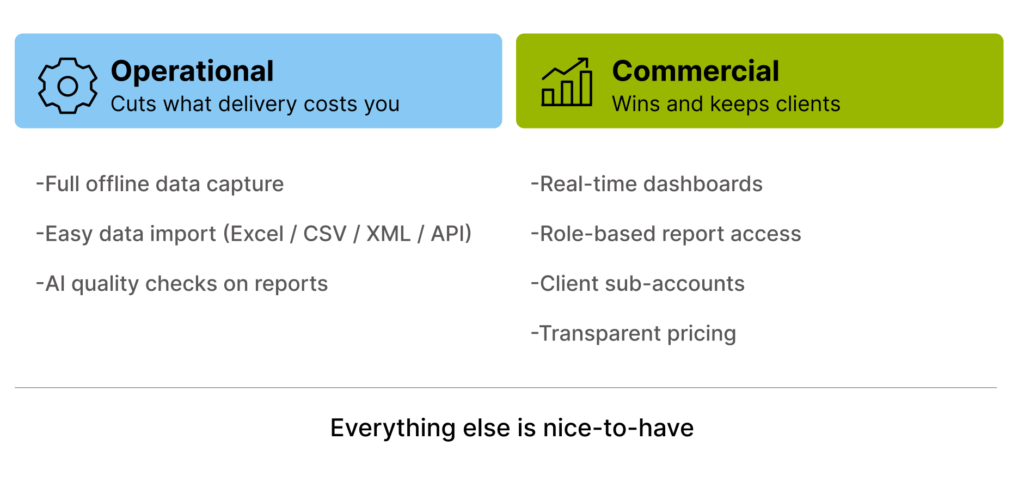
Platform feature lists run to 200 rows. They’re not 200 equally important rows. There are only 2 kinds of features you should care about as a market research agency, which are operational and commercial features.
Operational features
There are operational features, the ones that decide how many hours your team spends on a project. Offline capture, imports, automated quality checks. These compound. Save your PM four hours per project across 40 projects a year, and you’ve bought back a month of working.
Commercial features
Then there are commercial features, the ones your clients see and judge you on. Live dashboards, their own login, reports scoped to their role. These don’t save you time. They win renewals.
Everything else is a nice-to-have. If a feature doesn’t reduce your delivery cost or strengthen a client relationship, it’s decoration. But you shouldn’t be paying a premium cost for it, and you definitely shouldn’t be choosing a platform because of it.
The seven below are all one or the other.
The 7 features worth paying for
1. Full offline data capture
Your shoppers work in car parks, basements, rural branches, airport terminals, and shopping centres with concrete walls. Signal is not a given. When an app only caches partially, or drops the session on a reconnect, the shopper loses the visit and either re-enters it from memory (bad data) or refuses to re-enter it at all (no data, and one fewer shopper on your panel next month).
The best scenario should be that the whole questionnaire, including photo and audio attachments, is stored on the device until the shopper is back on a connection. Not a draft. Not the text fields only. The entire submission, and it survives the app being closed or the phone dying.
What you should ask the vendor:
- Does the app work with no signal at all, from start to submit?
- If a shopper attaches five photos offline and closes the app, are those photos still there tomorrow?
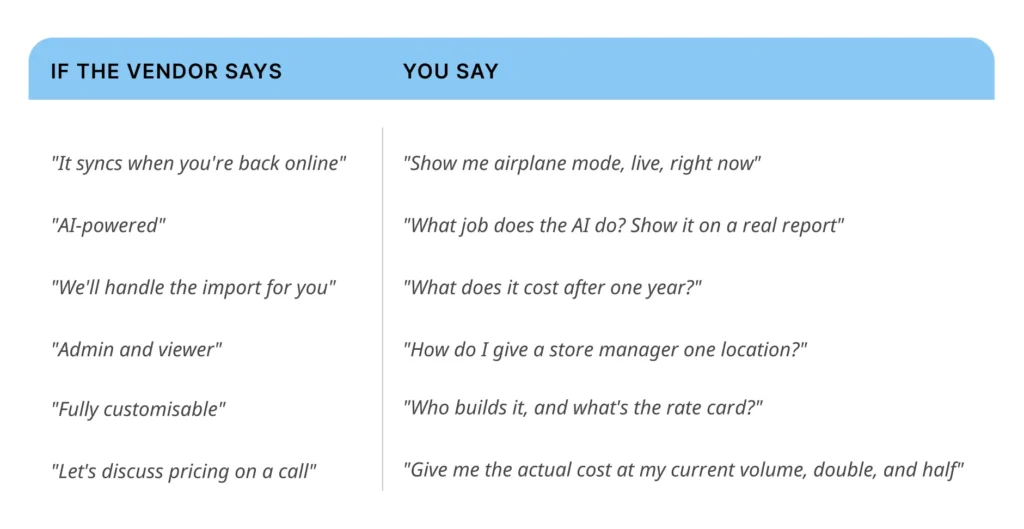
- Show me a shopper going through a full visit in airplane mode, right now, on this call.
Small tip here for you when taking the demo. Just experience the feature in real conditions. Make them demo it live in airplane mode because that’s the most accurate way to test it out.
2. AI that does a specific job
Quality checking for long questionnaires is the least scalable thing an agency does. A senior reviewer reads narrative comments looking for missing detail, contradictions between the score and the comment, sloppy grammar, and answers that don’t add up. On a 90-question hotel audit that’s real time, and it’s time you usually can’t bill.
What good looks like: The platform reads submitted reports before a human does and flags the ones that need attention, grammar and coherence problems, comments that contradict the score given, sections that look thin. Your reviewer then spends their time on the 15% that got flagged instead of the 100%. Bonus points if the platform can apply penalty and bonus rules to shopper pay automatically based on those checks, so the incentive loop closes without a spreadsheet.
What you should ask the vendor:
- Can it auto-check shopper answers for quality before my team reads them?
- What exactly does the AI check for, and can I see the flags it raised on a real report?
- Can a human override every AI decision, and is that override logged?
Also, be sceptical of AI features. You should always discuss with the vendor what actions the AI can perform exactly. Not just “AI-powered”. If the answer is a category (“insights”, “intelligence”, “optimisation”) rather than a task (“checks comments for contradictions and flags them”), it’s positioning, not a feature.
3. Data import that doesn’t need a developer
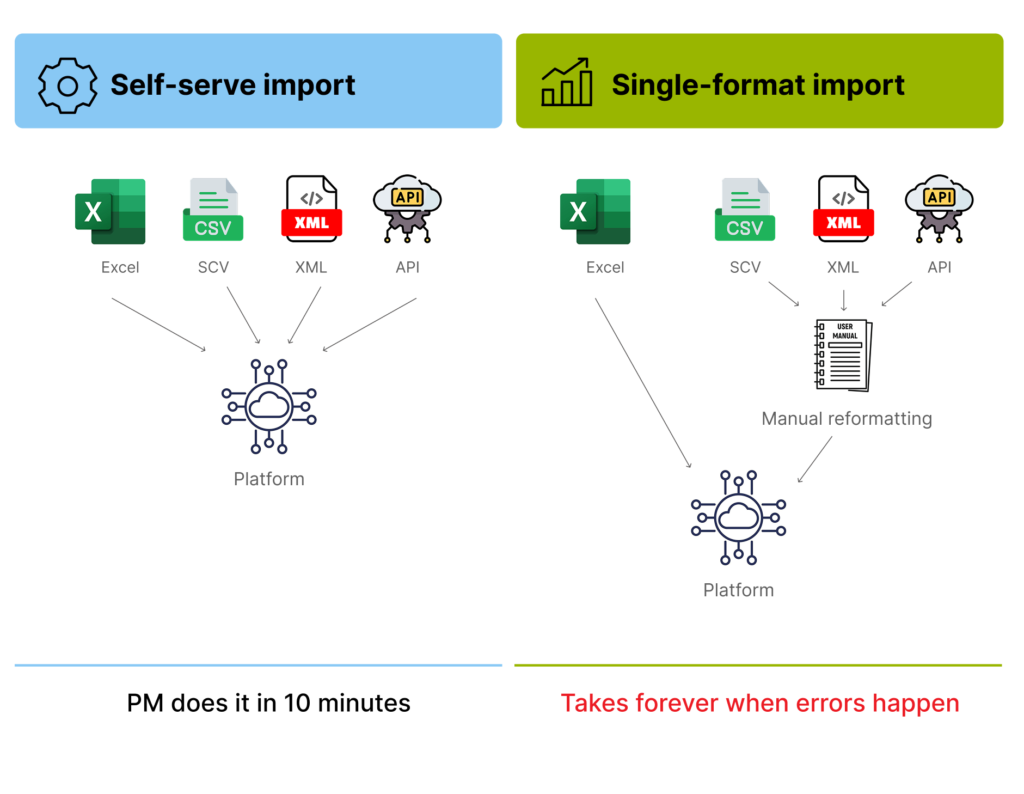
Imagine that a client sends location lists in Excel. A franchise partner sends a CSV with different column headers every quarter. The enterprise client’s CRM team offers you an API and a POS export in XML. If your platform only ingests one of these cleanly, someone on your team is reformatting files by hand every cycle, forever, and hand-reformatting is where wrong-location and wrong-date errors get introduced.
A good mystery shopping platform should offer Excel, CSV, XML, and API ingestion out of the box, with field mapping you can configure yourself and reuse next time. It should help your project manager do it with ease and no need to open a support ticket.
What you should ask the vendor:
- Which formats can I import without involving your support team, Excel, CSV, XML, API?
- Can I save a field mapping and reuse it for the same client next quarter?
- What happens to the rows that fail validation? Do I get a file back showing which ones and why
4. Role-based report access
When the client needs a report, you send one report to a retail client, and it lands with 50 people. The store manager in Lyon sees national results. The regional director sees stores outside her region. Somebody forwards a comparison table to the wrong internal audience, and you spend a week on a political problem that isn’t yours. Meanwhile, the people who should be acting on the data are hunting for the jungle of many other reports.
A cleaner option is allowing permissions defined by role and by scope. A store manager sees their store. A regional manager sees their region. The CX director sees everything. Same live report, filtered by who’s looking at it, without your team producing separate versions.
What you should ask the vendor:
- Can each manager see only their own locations, from one report?
- How many permission levels can I define, and can I set them myself without support?
- Can I restrict access down to a single question or section, not just whole reports?
Let’s dig a bit deeper into the permission model. Only two roles exist, admin and viewer. That’s a permission system, not a permission model, and you’ll end up building your own workaround by exporting bespoke files.
5. Client sub-accounts with a real hierarchy
What if every client wants their own login now? Some want to build their own questionnaires. Some want to invite their own colleagues. If your platform treats clients as an extension of your admin account, you’re either giving them keys to everything or acting as a human middleware layer every time they want a new user added.
A good answer is a multi-level account structure where you sit at the top with full oversight, each client sits in a walled sub-account, and the client can administer their own users beneath that, without ever seeing another client’s existence. This is the feature that lets you sell a client-facing self-service tier instead of a report subscription. It’s a commercial feature, not an operational one.
What you should ask the vendor:
- Can a client administer their own users without seeing anything belonging to another client?
- How many levels does the hierarchy go, agency, client, client’s regions, individual locations?
- Am I charged per sub-account or per user? What does it cost when a client adds 30 people?
6. Real-time dashboards you can configure yourself
Internally, you find out a fieldwork wave is running behind when the PM checks on Thursday, which is too late to fix. Externally, your client is looking at last week’s numbers and asking whether the thing they fixed on Monday actually got fixed.
You’d need a real-time report when data lands and the dashboard updates. No overnight batch, no manual refresh, no export-to-Excel step. And critically: you build and edit the dashboards. Every client wants a slightly different view, and if each of those views is a paid change request to the vendor, “custom dashboards” isn’t a feature you have, it’s a service you rent.
What you should ask the vendor:
- When a shopper submits at 14:00, when does it appear on the client’s dashboard?
- Can I build a new dashboard for a client myself, or does that come through you?
- Is there a charge for dashboard changes after onboarding?
7. Transparent, comparable pricing
You can’t compare four vendors when one prices per user, one per completed survey, one per location, and one per “module”, and all four quote you after a discovery call. You end up choosing based on rapport, and you find the real number in year two when usage grows.
So let’s discuss a pricing model you can model. Not necessarily a public price list, plenty of good B2B platforms quote, but a structure you can plug into your own spreadsheet and forecast at three volumes.
What you should ask the vendor:
- What is the unit of pricing, user, survey, location, or module?
- Show me the total cost at my current volume, at double, and at half.
- What is not included: implementation, support tier, API access, extra sub-accounts, dashboard changes, data storage, training?
- What happens at renewal if my volume dropped?
The nice-to-have features of a mystery shopping platform
None of these will make or break a programme on its own, and you shouldn’t reject a vendor for missing one. But once two platforms have both cleared the seven above, this is the tier where the decision actually gets made:
- In-app client communication management: Email and a shared spreadsheet already do this, badly. You lose the history, not the ability to deliver.
- Multilingual access: Worth a lot across six countries, worth nothing in one. Check your footprint before you pay for it.
- Accessibility tools: Readable contrast and scalable text buy you slightly longer comments. A real gain, but it shows up at the margins.
- Multi-channel data collection: SMS, email and phone surveys alongside field visits. That is capacity for work you have not won yet.
None of these are reasons to reject a vendor either. They’re just not the factors you should be deciding on.
Score your shortlist
This is the real shortlist you should print out, take it into each demo, and fill it in the same day, not a week later when the demos have blurred together.
Contact us and leave “Scoring shortlist” as the message. We’ll send you right away for free.
Run the mystery shopping demo properly
Most evaluations fail because the vendor drives. Take the wheel:
- Send your own data ahead of the call. A real location list, in the messy format your client actually sends it. Ask them to import it live.
- Bring one real questionnaire. Ideally your longest one. Ask them to build a section of it during the call.
- Ask for airplane mode. Not a video of airplane mode. Live.
- Ask to see the permissions screen. Not the dashboard, the screen where roles get defined. That’s where you learn how deep the model goes.
- Ask who else on their team you’d work with. Support quality decides whether year two is pleasant. Meet them before you sign.
- Ask for a reference at an agency your size. Not their flagship enterprise logo. An agency with your headcount and your project mix.
Where Checker fits
Full disclosure, since you’re reading this on our blog, Checker is one of the platforms you’d be evaluating.
We’ve been working in mystery shopping and CX research for over 20 years, across 60 countries and four continents, and we’ve been building our own research technology for more than 15 of those years. That combination is the reason this checklist looks the way it does, most of these seven items exist because agencies told us, in evaluation calls, exactly where their previous platform hurt.
For the record, on the seven above, our iOS and Android apps store every response locally for full offline work. Our AI runs grammar and coherence checks on submitted reports and can automate penalty and bonus scoring; imports come in via CSV, Excel, XML, API feeds and direct connectors. Report and dashboard access is granular and role-based. Checker account structure supports client sub-accounts with full oversight from your side. And dashboards update in real time as data lands.
We’d rather you ran this checklist across every vendor on your list, including us. An agency that picks a platform on evidence stays. One that picks on a good demo churns in eighteen months, and that’s bad for everyone.
Talk it with mystery shopping experts
If you’re partway through an evaluation and want a second opinion on your shortlist, your weightings, or what a migration off your current platform would actually involve, contact us for a free consultation. No pitch deck required. Bring your questionnaire and your messiest client file, and we’ll go through the checklist with you.
FAQ
A mystery shopping platform is the software an agency uses to run a mystery shopping programme end to end: building questionnaires, recruiting and scheduling shoppers, collecting field data through a mobile app or web portal, quality-checking submitted reports, and delivering results to clients through dashboards and reports.
“Software” often means a single function, a survey builder or a reporting tool. A platform covers the whole workflow in one system: fieldwork, data collection, QA, and client-facing reporting. For an agency, the difference matters because every gap between tools becomes manual work for your team.
Pricing models vary widely, per user, per completed survey, per location, or per module, which is why direct comparison is difficult. Ask each vendor to quote your total cost at your current volume, double it, and half it. That comparison is more useful than a headline rate.
Some do fully, some only partially. Full offline capture means the entire questionnaire, including photo and audio attachments, is stored on the device until connectivity returns. Partial offline caching can still lose a submission. Always ask for a live demonstration in airplane mode rather than accepting a claim.
It depends mainly on how much historical data and how many active client configurations you’re moving, not on the software itself. Ask any vendor you’re evaluating for a migration plan with named steps and a timeline before you sign, and ask to speak to an agency that has completed one with them.


