



If you run a mystery shopping agency, you already know the real problem isn’t finding shoppers or writing questionnaires. It’s holding the whole operation together with tools that were never meant to work as a system.
A project brief lives in a shared drive. Shopper assignments go out over email. Scores get pulled into a spreadsheet that someone has to manually check against the client’s SLA. And somewhere in the middle of all that, an old platform you bought years ago is quietly costing you hours every week because it only does half the job.
This is the point where most agency owners start looking at mystery shopping software seriously, not as a nice-to-have, but as the thing standing between them and actually scaling the business. This guide walks through what the software should do, stage by stage, so you know exactly what to compare when you start evaluating vendors.
We’ve spent more than 20 years building and running these programs across 60 countries, and the breakdown almost always looks the same: the setup that works fine at ten locations a month starts falling apart around 200.
What Mystery Shopping Software Is Supposed to Do
Mystery shopping software isn’t just a survey tool with a mystery shopping label on it. A proper platform manages the entire program from the moment a client signs on to the moment they open a finished report. That’s a much wider job than most survey tools are built for.
That means it needs to handle:
- Project and location setup
- Questionnaire and scorecard building
- Shopper recruitment and assignment
- Data collection, online and in the field
- Quality control before anything reaches a client
- Reporting and client-facing dashboards
Agencies that try to run this with a patchwork of spreadsheets, forms, and email threads usually hit the same wall: everything works fine at ten locations a month, and falls apart at two hundred. Software built specifically for mystery shopping is what lets you take on more volume without adding headcount just to keep the process from breaking.
Read more: Why Excel Is Still Breaking Mystery Shopping and CX Programs in 2026
Setting Up Projects and Questionnaires
Every program starts here, and it’s where a lot of time gets wasted if the tool wasn’t built for it. You need to define locations, set evaluation criteria per client, and build a questionnaire that can handle conditional logic, since not every question applies to every visit type.
A platform designed for this lets you reuse templates across clients, adjust scoring weights per question, and set up branching so a shopper only sees the questions relevant to what they actually observed. Without that, you end up maintaining separate versions of the same questionnaire, which is exactly how scoring inconsistencies creep into a program.
Recruiting and Managing Mystery Shoppers
Shopper management is where agencies feel the most pain day to day. Recruiting enough shoppers in the right locations, verifying who’s actually qualified, assigning jobs, and tracking who completed what and when, is a full-time job on its own if you’re doing it manually.
Good mystery shopping software gives you a shopper database with performance history, lets you assign jobs based on location and availability, and tracks certifications so you’re not sending an untrained shopper into a job that needs specific expertise. It should also give you visibility into budget and actual cost per project, since shopper payments are one of the easiest places for margins to quietly disappear.
Collecting Data in the Field
Field collection is where data integrity actually gets tested, and it’s the failure we hear about most when agencies come to us. The story is nearly always the same: a shopper works through a long hotel audit, the property Wi-Fi drops, and the whole submission is gone. They re-enter everything, or the visit is lost.
Shoppers need a way to submit visits with photos, audio, or video, ideally from a mobile app rather than a paper form or a generic survey link.
Mystery shopping software should support offline data collection so a shopper working in a store with poor signal can still complete a visit and have it sync once they’re back online. Look for fraud prevention built into the collection process itself: GPS tagging, EXIF data checks, timestamp validation. These aren’t extras. They’re what stops a client from ever questioning whether a visit actually happened.
Quality Control Before Reports Go Out
This is the stage most agencies underinvest in, and it’s usually the one that costs them the most in client trust. Every submitted visit needs a QC pass before it becomes a report, checking for completeness, consistency, and flags that need a second look.
A mystery shopping platform should let you build your own QC workflow: multiple review stages, assignment to specific QC team members, automatic approval after a set time if nothing’s flagged, and the ability to check every detail of a submission, including timestamps, geolocation, and attached media, in one place. Manual QC in a spreadsheet doesn’t scale, and it’s the first thing that breaks when project volume goes up.
Reporting and Client Dashboards
The report is the product your client is actually paying for, so this is where the software needs to do the most work with the least friction. Clients expect branded reports they can trust and dashboards where they can look at their own data without waiting for you to send an export.
Look for automated report generation in PDF and Excel, along with a real-time dashboard your client can access on desktop or mobile. Filtering and grouping options matter here too, since a regional manager and a head office analyst need to see the same data in completely different ways.
Feature Comparison Checklist for Mystery Shopping Software
Use this as a working checklist when you’re comparing platforms. Not every agency needs every feature, but you should know exactly what you’re giving up if a vendor doesn’t have something on this list.
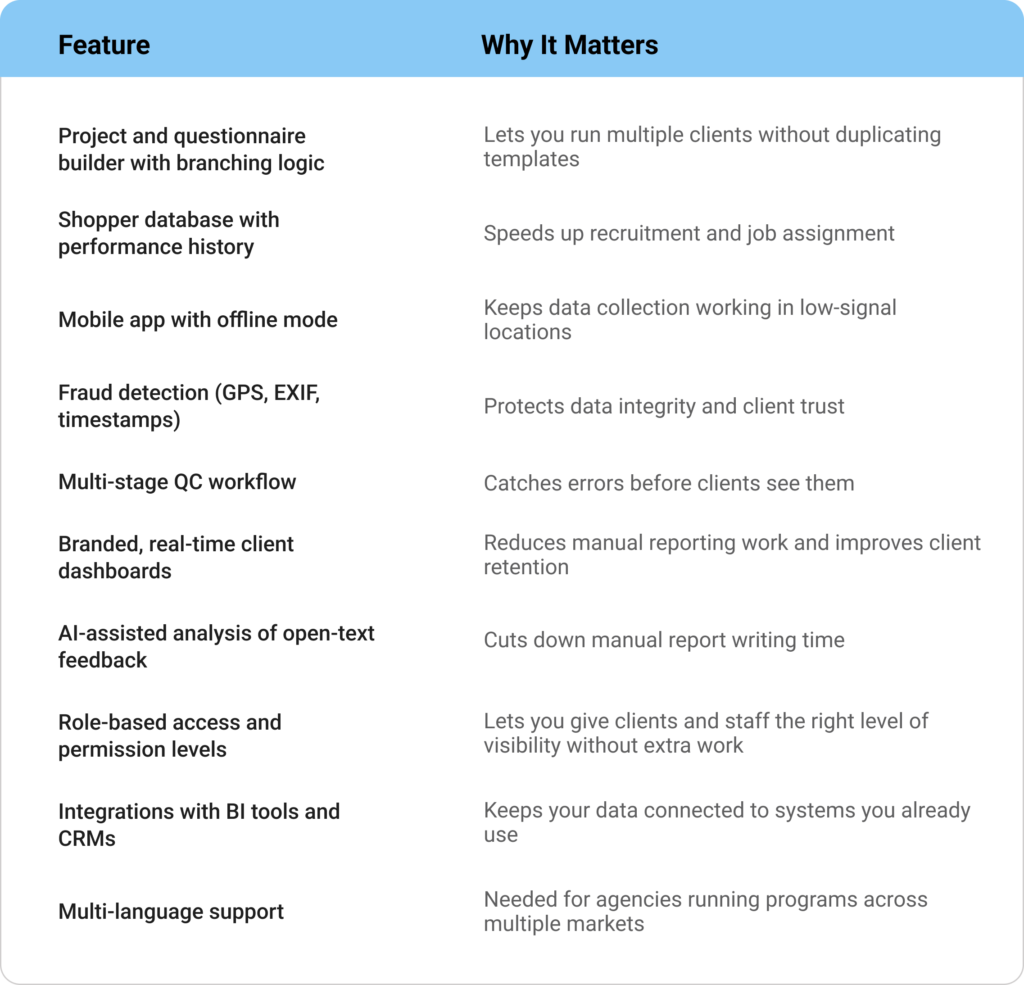
The Features Agencies Ask About Most
A few features come up in almost every conversation with agency owners evaluating new software. Here’s what to actually check for on each one.
Offline mobile app. Shoppers don’t always work with reliable connectivity, especially in retail basements or rural locations. The app should let a shopper complete a full visit offline and sync automatically once they’re back online, without losing photos or video attached to the submission.
AI-assisted quality checks. AI in this context should mean faster analysis, not less human oversight. Sentiment analysis on open-text answers, keyword extraction, and automatically generated summaries save real hours on reports that used to take a QC analyst a full afternoon to write up.
Automation. Look for automated review rules, automatic approval timers in QC, and automated report delivery. The goal is fewer manual steps between a completed visit and a client seeing the result.
Real-time dashboards. Clients shouldn’t have to email you for an update. A live dashboard they can filter and view on any device removes a huge amount of back-and-forth from the relationship.
Client-level access control. Different clients, and different people within the same client account, need different views of the same data. Role-based permissions and hierarchical access let you set that up once instead of managing it manually for every project.
Clear pricing. You should be able to get a straightforward quote based on your program size and modules needed, without hidden fees for basic features like mobile access or reporting.
How Checker Covers the Full Mystery Shopping Journey
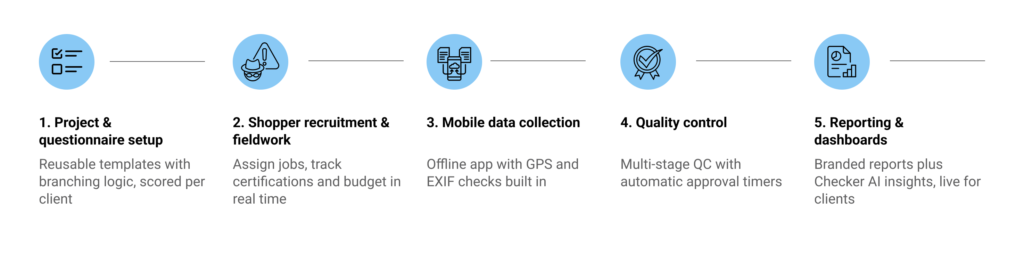
Checker was built around this exact workflow, not assembled from separate tools bolted together. Project setup, questionnaire building, shopper recruitment, fieldwork tracking, and budget control all sit inside one system, so nothing gets managed in a side spreadsheet.
The Checker Field Surveyor app runs on Android and iOS, supports offline data collection, and captures GPS and EXIF data automatically to protect data integrity. On the QC side, you can build your own multi-stage review process, assign jobs to specific team members, and set automatic approval timers so nothing sits waiting for a manual check that never comes.
Reports go out branded and automated in PDF, Excel, or as a live dashboard, with filtering options so head office and regional teams can each see the data the way they need to. Checker AI adds sentiment analysis, keyword extraction, and automatic executive summaries on top of that, cutting down the manual analysis work your team is doing right now. Role-based access and permission levels mean your clients and staff each see exactly what they should, and integrations with tools like Power BI, Tableau, and Salesforce keep your data connected to the rest of your stack.
If you’re weighing up whether to switch platforms or build your program properly for the first time, the fastest way to see how this fits your actual workflow is to walk through it with someone who knows the industry. Book a demo with Checker and see the full platform in action.


